 Contact Us



Timeline Export: Video vs AXP
In PIXERA, it’s possible to export the Timeline either as a video or as a .axp file.
If you want to create a .axp file, please check out the following article: Timeline Export/Import.
PIXERA can export either a specific part of a Timeline or a Timeline as a whole in the form of a video.
This is done by clicking the Export Selected Timeline icon in the Timelines Tab or the Export Timeline icon from the Timeline Tools.
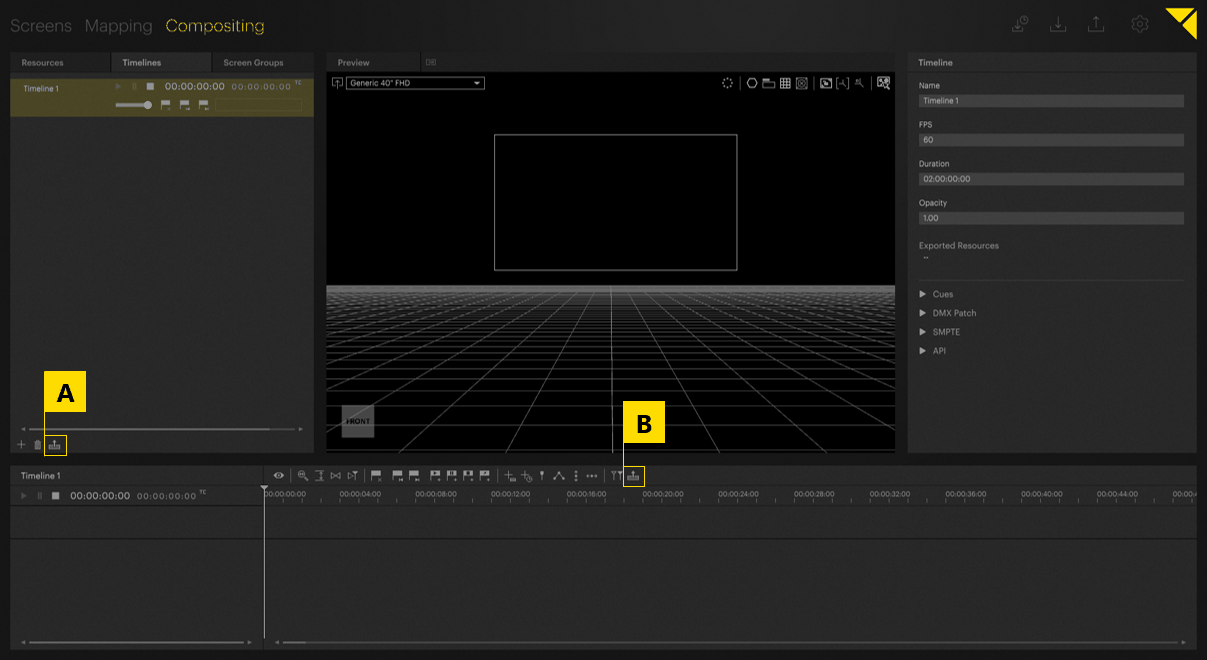
After clicking one of the icons, the following dialogue will appear to adjust the export settings and start the export using the bottom right button:
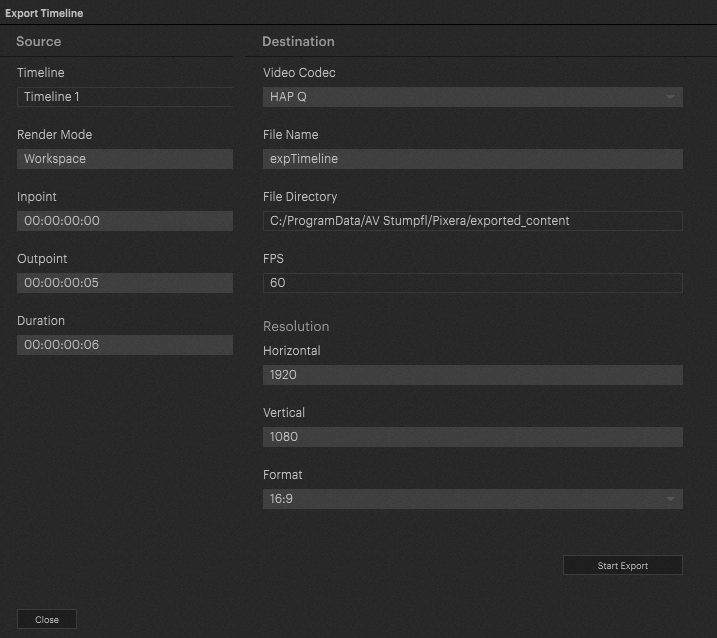
Source
Render Mode
There are two options to choose from for how the render is performed:
-
Workspace: Renders the view of the currently being used Preview Camera.
-
All Screens: Renders the surface view of all Screens together.
- Single Screen: Renders the surface view of the chosen Screen.
Inpoint, Output, and Duration
There are three timing settings on how long the video will be and what frames it will render:
-
Inpoint: What time the Timeline should start rendering content.
-
Outpoint: What time the Timeline should stop rendering content.
- Duration: The difference between the Inpoint and Output. Will be automatically set when changing the Outpoint, will automatically change the Outpoint if this is set.
Destination
There are several settings involved in how the final video file should take shape:
-
Video Codec: HAP Q, VP9, PNG Image Sequence, TIFF Image Sequence, or EXR Image Sequence rendering.
-
File Name: Name of the video file.
-
File Directory: Folder to save the video file to.
-
FPS: Locked to the FPS of the exported Timeline.
-
Resolution: Will stretch or compress content if a different resolution.
-
Horizontal: Horizontal pixel count for the video.
-
Vertical: Vertical pixel count for the video
- Format: Will change Horizontal to fit the Aspect Ratio selected. Will also force the Resolution changes to stick with this Aspect Ratio.
-
Horizontal: Horizontal pixel count for the video.
Please also reference the below video on this workflow, as well as Content Transcoding.
PIXERA 26.1 R 1 | 06 May 2026 | C.L.